Adjust the permissions for an address layer

In TLNplanner, you can specify which authorizations other users in your company have for the address layers created. For this purpose, an address layer always has one of the following statuses:

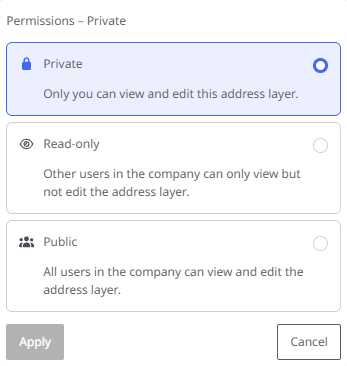
  • Private - Only the user who created the address layer can view and edit the layer.

  • Read only - All users in the company can see and use the address layer. Only the user who created it can edit it.

  • Public - All users in the company can view, use and edit the address layer.

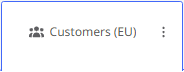
The status of an address layer is indicated by a symbol in the level tile.

To change the status of an address layer,

  1. hover the mouse pointer over the tile of the address layer,

  2. then click on the < Change address layer permission> button. The selection window for permissions is displayed.

  3. Now select the desired status for the address layer.

Note: The availability of the three status options depends on the respective address layer.

  • A layer that you have created yourself initially has the status "Private" and you can set it to "Read only" or "Public".

  • A layer that has been set from "Private" to "Read only" cannot be changed back to "Private" status.

  • A layer that has been set from "Read only" to "Public" can be set back to "Read only" status by the creator.